

1. Install and scaffold
init creates .smithers/ with seeded workflows, prompts, and components. The
bun deps add Smithers and Zod (schemas); codex login authorizes your Codex
subscription for workflow workers.
Zod v4 is required. Smithers introspects output schemas via Zod v4
internals; pin
zod@^4, or a v3 schema fails building an agent command
with the cryptic error undefined is not an object (evaluating 'schema._zod.def').tsconfig.json:
jsxImportSource is the only Smithers-specific line; it routes JSX through the workflow runtime instead of React DOM.
2. One-task workflow
createSmithers registers Zod schemas as durable output relations the runtime manages. outputs.greeting is the typed reference for the greeting schema; using it as the output prop catches typos at compile time (outputs.greting is a type error).
The input key is special: its schema types ctx.input, so ctx.input.name is a checked string, not unknown; every other key, like greeting here, is an output table. Omitting input leaves ctx.input untyped, forcing a defensive guard on each field (ctx.input?.name ?? "world"). Fresh runs and graph previews parse input through this schema, so Zod defaults and transforms are available in ctx.input. Continue to coalesce fields declared optional or nullable.
This Task has no agent, just a literal value. Run it.
getNodeOutput({ runId, nodeId: "greet" }), never the backing store directly;
SQLite/PGlite/Postgres are interchangeable runtime details.
3. Add an agent task
Replace the literal Task with an agent Task whose output is structured.outputs.analysis into the prompt, parses the agent’s response, validates against Zod, and persists. Validation failure triggers a retry.
4. A second task that depends on the first
Tasks see each other’s outputs throughctx.outputMaybe(...): an incomplete upstream returns undefined, and once it appears on a later render frame, the downstream Task mounts.
When a Task consumes exactly one upstream output, <Task deps={{ analyze: outputs.analysis }}> with a (deps) => ... callback is more ergonomic; reach for ctx.outputMaybe to inspect content or gate multiple siblings.
analyze. Render 2, once analyze finishes: analysis is populated, fix mounts and runs. That’s the whole reactivity story: no hooks, no subscriptions, just JSX conditionals over persisted state.
The same shape covers branching, parallel groups, and loops: ?: is the inline
conditional form, <Branch> the declarative form for
explicit then/else (as props, not children):
5. An approval gate
Pause for a human: the runtime persists the decision and exits cleanly. The operating agent relays the question, then approves or denies through the CLI; resume continues from the gate.onDeny controls rejection: "fail" aborts the run, "continue" proceeds without the approved branch, "skip" skips the gated tasks.
6. Crash, then resume
Every completed task’s output sits in SQLite. A crash, kill, or restart loses no work; the next run with--resume true skips finished tasks.
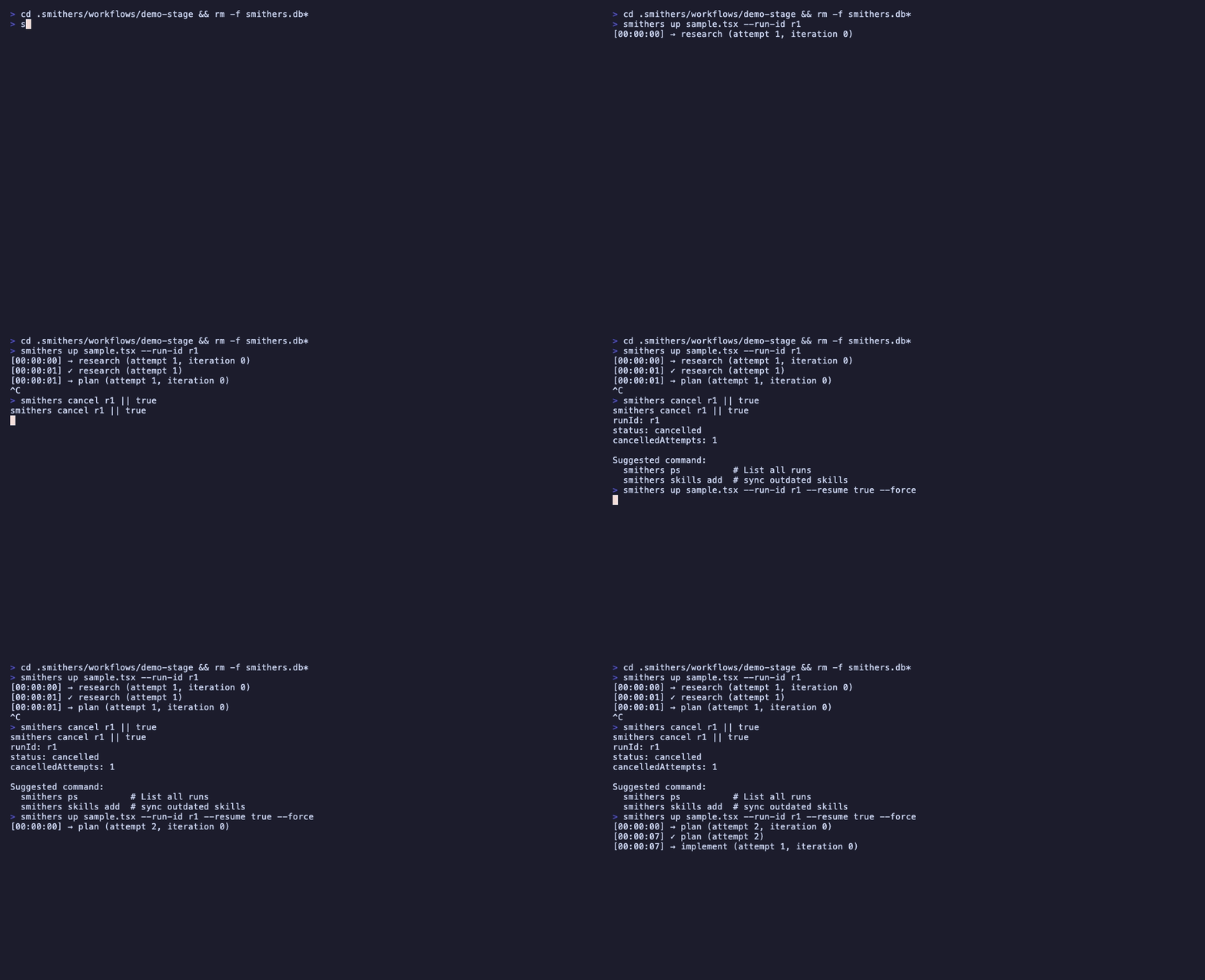
The same crash-and-resume mechanic: a run is killed mid-task, then resuming skips the finished work and re-runs only the interrupted task from its last persisted frame.
What you skipped (and where to find it)
- Time travel (replay a frame, fork a run, diff two runs):
bunx smthrs replay|fork|diff|timeline, detailed in How It Works → Time travel. - Scorers (attach evaluators to Tasks): Recipes → Scoring tasks.
- Memory (cross-run facts and message history): How It Works → Memory.
- RAG, voice, OpenAPI tools: opt-in fragments, indexed in llms.txt.
- Tool sandbox (read/grep/bash with path containment): Recipes → Tools.
Read next
- How It Works: the render → execute → persist loop.
- Components: JSX surface reference.
- CLI: every command in one table.
- Recipes: patterns from production workflows.