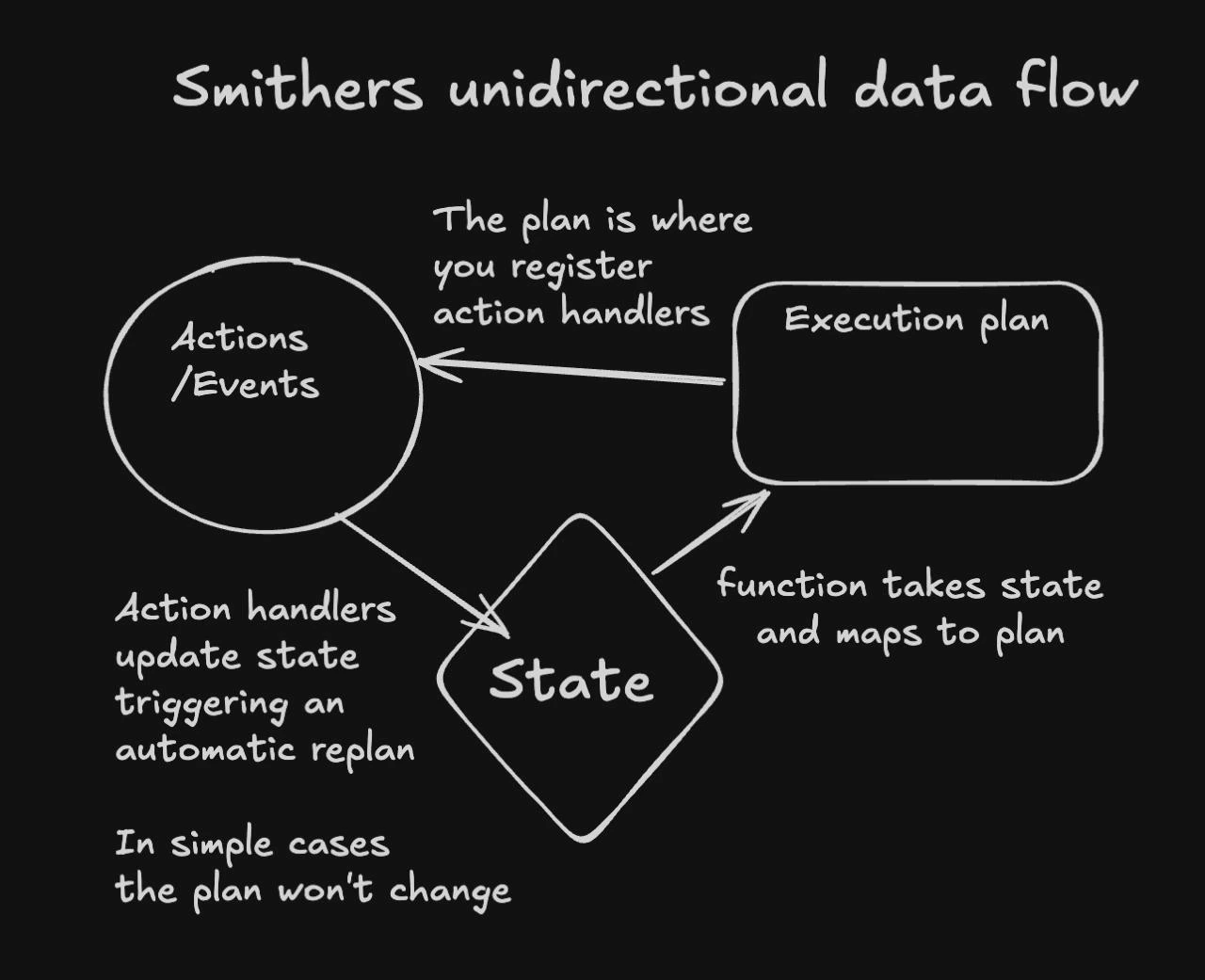
The Cycle
- State is persisted in SQLite — task outputs, cursor position, iteration counts.
- A render function maps that state to an execution plan (your JSX tree).
- The engine executes the next ready task, which emits an event.
- The event handler writes new state, triggering a re-render.
- Go to 1.
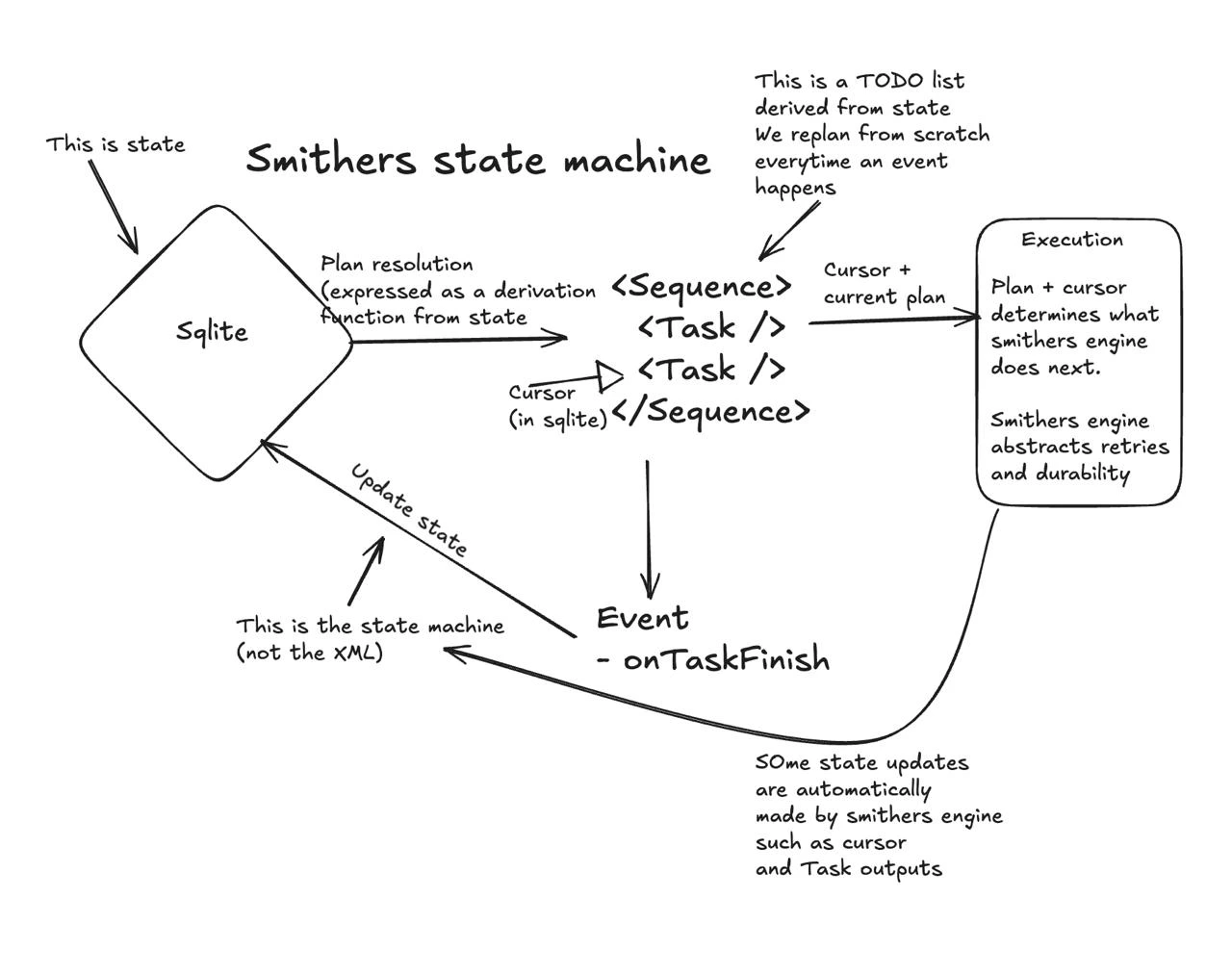
Three Levels of Plan Evolution
You might be thinking: “If the plan is just a function of state, how does it actually change over time?” Good question. It changes at three progressively deeper levels, and understanding them is the key to thinking in Smithers. Picture a flipbook. You know the kind — a stack of pages, each with a slightly different drawing, and when you flip through them fast enough you see animation. Every Smithers run is a flipbook. Each page is a frame: the complete execution plan at one moment in time. Now: what can change between pages?Level 1: Cursor Movement
The simplest kind of animation. The drawing stays the same; only the highlight moves. Inside a<Sequence>, the cursor advances from one task to the next as each completes. The plan itself doesn’t change — only which task is active.
Level 2: Reactive Re-rendering
Now it gets interesting. What if you don’t know the full plan at the start? Every time a task finishes, Smithers re-renders the entire JSX tree with the updated state. This is not just moving a cursor. This is drawing a new page with more tasks on it than the page before.analyze exists in the plan. The fix tasks are not hidden or waiting — they literally do not exist yet.
Frame 2: analyze finished and found 3 issues. Now fix-1, fix-2, fix-3 appear. The plan grew from 1 task to 4.
Stop and let that sink in. You never told Smithers “after step one, create three more steps.” You wrote a function that takes state and returns a plan. When the state changed, the plan changed. The plan is a derived value — a pure function of state. You never mutate it. You update state, and the plan follows.
This is the aha moment. If you have worked with React, it is the same insight: you don’t manipulate the DOM, you describe what it should look like given the current data, and the framework figures out the diff. Smithers does that, except the “DOM” is an execution plan and the “data” lives in SQLite.
Level 3: Hot Reload (--hot)
The first two levels change what’s on the pages. Level 3 changes the art style — the source code itself.
With the --hot flag, you can edit the workflow definition, prompts, or agent configurations while the run is in progress. Smithers picks up the changes on the next render cycle without restarting.
- Edit a prompt mid-run to steer an agent differently
- Add a new task to the plan while earlier tasks are still executing
- Adjust retry policies or timeout values live
Why One Direction Matters
You could build workflows with bidirectional data, callbacks, event buses, pub/sub channels. Plenty of orchestration frameworks do. So why does Smithers insist on one direction? Because constraints buy you things.Easy to Write
LLMs already know React. A Smithers workflow is a function that takes state and returns JSX. No graph DSL, no edge definitions, no scheduler configuration. An LLM can generate correct workflows the same way it generates React components — because that’s exactly what they are.Easy to Read
Data flows one way: state down, events up. When you read a workflow, you see the full plan for any given state right there in the JSX. There is no action-at-a-distance. No callback registered elsewhere that secretly modifies the plan. If you want to know what the plan looks like whenanalysis has three issues, read the function with that state in your head. That’s it.
Easy to Debug
Every render produces a frame — a snapshot of the complete plan at that moment. When something unexpected happens, the debugging process is mechanical:- Find the frame where the plan diverged from what you expected.
- Look at the state that produced that frame.
- The bug is in the gap between the state you see and the plan you expected.
Time Travel
Since every frame is persisted, you can inspect the history of your workflow and choose the task attempt you want to restore.revert operates on JJ-backed attempt snapshots rather than arbitrary frame numbers.
The Mental Model
Come back to the flipbook.- Each page is a frame — the complete execution plan at one point in time.
- Flipping forward happens automatically as tasks complete (Level 1).
- Drawing new pages happens when state changes cause the plan to evolve (Level 2).
- Redrawing the art style happens when you change the source code with
--hot(Level 3).
Next Steps
- Reactivity — Deep dive into the render-schedule-execute loop and React patterns.
- Execution Model — How the engine turns frames into durable task execution.
- Workflow State — The ctx API and how state flows between tasks.