

API reference: Types lists every public type, its fields, and links to source and tests.

The whole runtime in one loop: render the tree, extract the ready tasks, execute them, persist their outputs, then re-render against the new state. State is the source of truth; the plan is a pure function of state.
The render loop in detail
- Render. The runtime calls your
smithers((ctx) => ...)builder. React reconciles the returned JSX tree into a graph of host elements (smithers:workflow,smithers:task,smithers:sequence,smithers:parallel,smithers:branch,smithers:loop,smithers:approval, etc.). - Extract. The runtime walks the tree into a
GraphSnapshot, a flat list ofTaskDescriptors. Each descriptor captures: node id, ordinal, dependencies, output schema, agent, retries, timeouts. - Schedule. The scheduler computes the ready set: tasks whose dependencies have completed, whose sequence has reached them, whose branch resolved them, and which fit
maxConcurrency. - Execute. Each task runs in one of three modes: agent (call the LLM, validate output against the Zod schema, retry on failure), compute (run the function), static (write the literal value).
- Persist. Validated outputs are written to per-schema SQLite tables. Internal
_smithers_*tables capture node state, attempts, frame snapshots, events, and durable approval/signal state. - Re-render. The next frame begins with
ctxreading the updated outputs. Tasks depending on now-completed outputs mount on this frame and become eligible.
The ctx API
ctx is the only way the workflow body talks to the runtime.
Outputs are keyed by
(runId, nodeId, iteration). iteration is 0 outside loops; inside <Loop> each pass writes a new row at the next iteration index.
The table argument is the schema key or output target from createSmithers
("review" or outputs.review), not a raw SQL table name; the runtime resolves
it to the actual persisted table.
Tasks: three modes
supportsNativeStructuredOutput = true (AnthropicAgent
and OpenAIAgent by default), Smithers passes the Zod schema to
agent.generate({ outputSchema }), forwarded through the AI SDK’s native
structured-output channel (Output.object({ schema })). Otherwise (most CLI
agents, including ClaudeCodeAgent), Smithers injects JSON instructions into
the prompt, extracts JSON from the text, validates it, and warns about the
fallback. Validation failure feeds the error back into a retry attempt, so
agents self-correct on schema drift.
Agents can be a fallback chain: agent={[primary, fallback]} tries primary first and falls through on failure.
Control flow
Four primitives. Compose freely.<Sequence> is only needed when nesting sequential groups inside <Parallel> or another control-flow primitive.
Use .map() and ternaries when the number or presence of tasks depends on state. Use <Parallel> and <Branch> for fixed task sets whose execution shape depends on state.
<Loop> is the one primitive that re-renders the same body repeatedly until until holds or maxIterations is reached (below). That cycle turns a one-shot agent into one that keeps swinging until the tests are green.
Data flow is unidirectional
Workflow state lives in SQLite; the render function is a pure function ofctx (which reads it). Tasks emit outputs, the runtime persists them, and the next render reads them: no mutation, no refs, no useState for durable values.
This is the same shape as React rendering UI from props/state, except:
- the “DOM” is the task graph
- “events” are task completions
- “state updates” are output writes that the runtime triggers
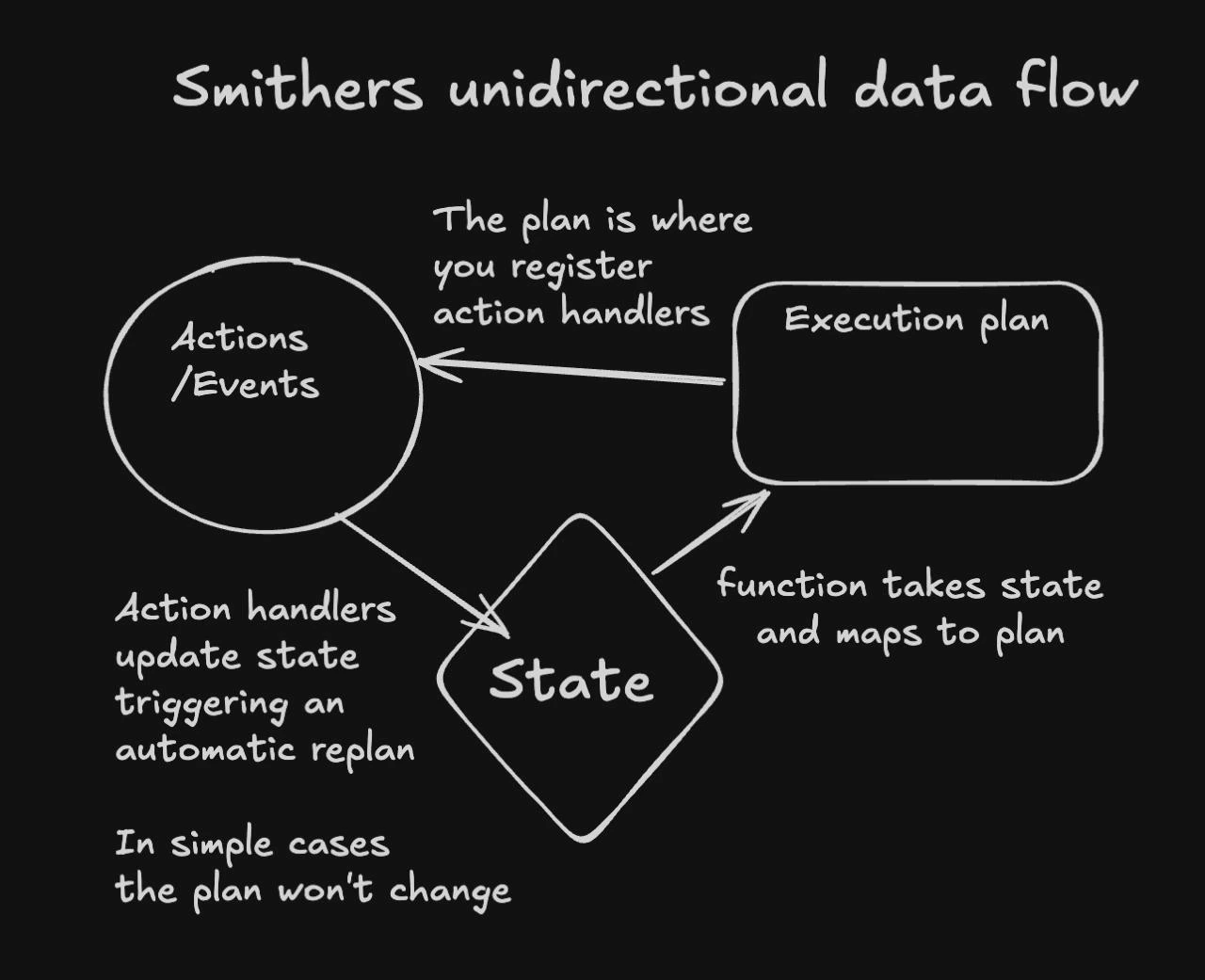
State is the only source of truth. Task completions update it, and the next plan is a pure function of that state, so you never mutate the plan by hand.
- The plan is a derived value, recomputed on every state change instead of mutated by hand.
- Time travel works because every frame is a snapshot of (state → plan).
- Hot reload works because reloading the workflow code with the same persisted state produces a new plan; the runtime diffs the two and continues from where you left off.
Reactivity & React patterns
Smithers JSX is real React. Components, props, children, composition, context, hooks, custom hooks: all work.useState and useMemo are process-local: the engine reuses one React root across frames, so hook state survives within a live process but is never persisted; a crash, resume, rewind, or fork starts a fresh process where every hook reinitializes. Use them only for ephemeral render-time state. Anything the workflow must remember across crashes goes through ctx and a Task output.
Conditional mounting matters: a Task that doesn’t render isn’t in the plan, with no “skipped” placeholder unless you use <Branch> or skipIf. That’s what lets {analysis ? <Task .../> : null} work as a clean dependency check. For one Task consuming one upstream output, <Task deps={{ analyze: outputs.analysis }}> with a (deps) => ... children callback is the more ergonomic form of the same check.
Approvals & human-in-the-loop
Two surfaces.needsApproval on a Task is a gate: pause before execution, no decision data:
<Approval> is a decision node: it produces a typed ApprovalDecision row that downstream rendering can branch on:
"fail", "continue", "skip".
Operator side is identical for both (you, the agent, run these on the human’s behalf; never hand them to the human):
<HumanTask> is for richer interaction: a human submits arbitrary structured JSON. <EscalationChain> and <ApprovalGate> are higher-level patterns built from these.
Durability & resume
The contract: a completed task is never re-executed. Resume loads persisted state, validates the environment (workflow source hash + VCS revision must match the original run), cleans stale in-progress attempts (>15 min without a heartbeat are abandoned), re-renders, and continues.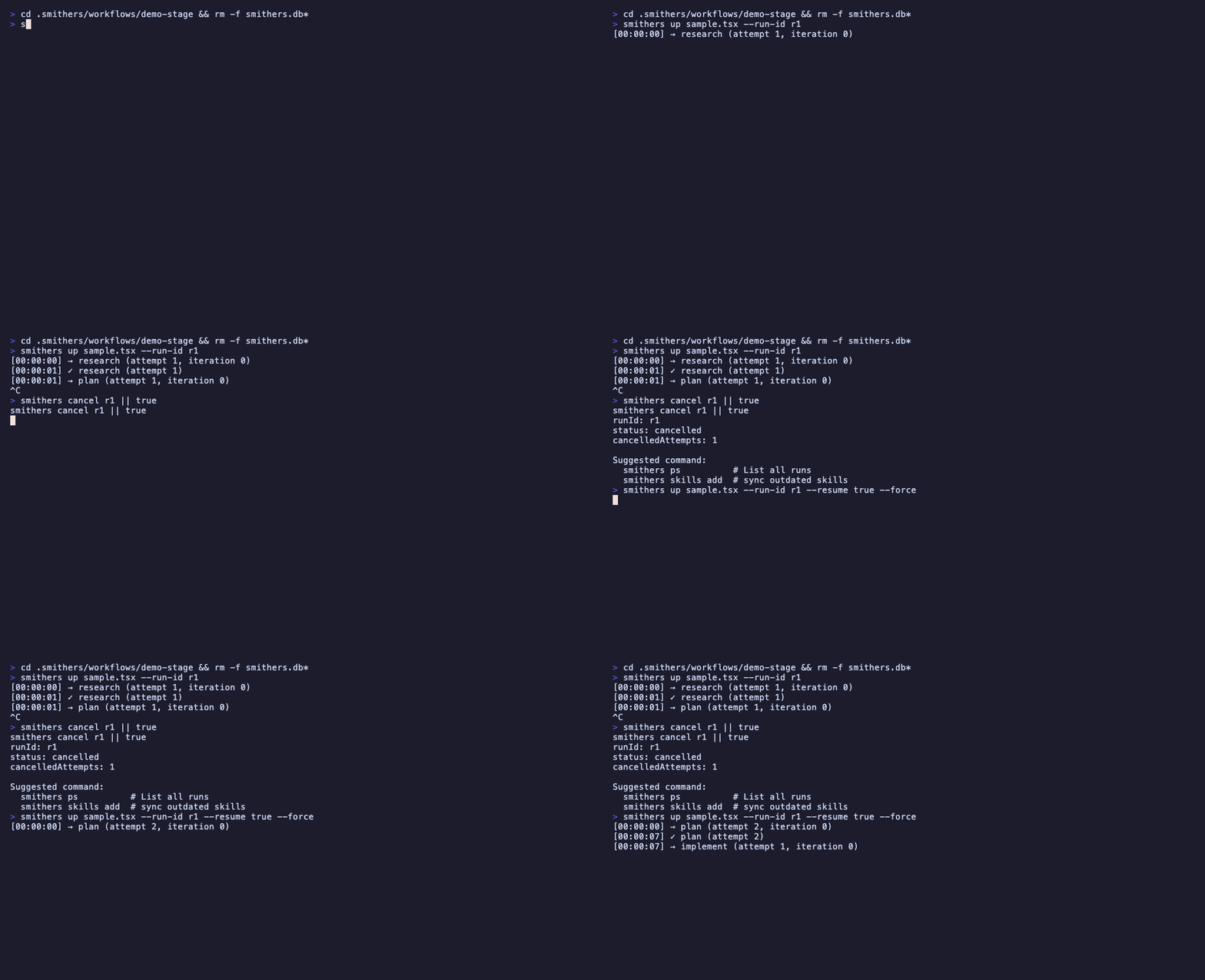
A run is killed mid-flight: the completed task is skipped on resume, the interrupted one re-runs as a fresh attempt, and the run finishes from the last persisted frame instead of starting over.
--run, or opt into the workspace-wide sweep with --all.
Session snapshots & fork
Every agent task persists its conversation as a durable session snapshot alongside its output; a later task can start from a copy of it withfork:
fork is immutable: it copies the source conversation into a fresh, independent session, submits the new prompt, and leaves the source untouched, so many tasks can fork it in parallel and a forked task can itself be forked. Reading the snapshot from persisted state on each attempt makes fork resume-safe: the source is never re-executed. Inside a <Loop>, fork resolves to the latest completed snapshot for that task id. See <Task> fork.
Caching
Per-Task caching with explicit invalidation:cache.by(ctx) + cache.version + the schema signature (SHA-256 of the table structure). A schema change invalidates the cache automatically.
Don’t cache side-effect tasks (deploys, emails, mutations). Caching is for pure work that’s expensive to recompute.
Time travel
Every frame commit produces aGraphSnapshot.
--restore-vcs checks out the jj revision the snapshot was taken at, so re-execution sees the same source code as the original run.
Before history is discarded or replayed, Smithers reads the effect journal.
Each marked tool call or Task moves through these states:
unknown is deliberately conservative. A process can stop after an API
accepted a request but before Smithers records its response. The guard treats
unknown like succeeded.
effectStatus: "unknown". It should throw instead of guessing. Discard
commands run handlers in reverse effect order before changing VCS or database
history. --no-revert skips handlers; --force crosses what remains and
marks the run for attention.
The git exemption is exact: commits, ref changes, worktree writes, and
git push are not external effects. GitHub API state, including issues, PR
comments, and PR merge status, is external and must be marked.
Scorers (evals)
Attach evaluators to a Task. They run after completion and never block.schemaAdherenceScorer, latencyScorer, relevancyScorer, toxicityScorer, faithfulnessScorer. Sampling: all / ratio / none. Custom scorers and LLM-judge scorers with createScorer and llmJudge.
Five delegation scorers back the delegation-chain workflow: pocJudgmentScorer (probe judgment; false negatives punished hardest), planSolidityScorer (post-execution replan churn), estimateAccuracyScorer (forecast vs. actual cost/time/tokens), tierFitScorer (was the intelligence tier right), and humanPollScorer (end-of-run user poll), combined by delegationRunScore / weightedScore, with extractDelegationEvents and resolvePlanningNodes as the shared event readers.
Also exported: runScorersAsync, runScorersBatch, aggregateScores, the smithersScorers table, token-cost helpers (modelTokenPrices, estimateCostUsd), scorer metrics (scorersStarted, scorersFinished, scorersFailed, scorerDuration), and the side-effect analyzer APIs sideEffectAnalysis and gradeSideEffectCompliance.
Shared by the eval-suite-run seeded workflow and the evals gateway extension: parseEvalDataset (parses a JSON array or JSONL dataset), evaluateEvalCase (grades a case’s status/output/error against expected: an assertion spec of status/output/outputContains/errorContains, or a literal value matched by subset/deep-equal), evalAssertionScorer (turns a graded case’s assertions into a scored row), evalCaseRunId (a readable, collision-free child-run id), the EVAL_CASE_STATUSES and EVAL_PASS_THRESHOLD constants, and the low-level primitives slugifyEvalToken, jsonEquals, jsonContains, normalizeExpected, formatEvalError, and isPlainObject.
Memory (cross-run state)
Memory is state that survives across runs: namespaced facts and message history, not task outputs (which are per-run). Three layers, four namespaces (workflow, agent, user, global). Three processors (TtlGarbageCollector, TokenLimiter, Summarizer). See the full docs bundle for the full surface.
Tools, execution environment & sandboxing
Five built-in tools (read, write, edit, grep, bash) sandboxed to rootDir. Symlinks, network, and timeouts are denied by default; --allow-network opens bash to the network.
Least-privilege per task:
defineTool builds custom tools. Mark side-effecting ones with sideEffect: true and use ctx.idempotencyKey so retries don’t double-fire.
Where agents run & what’s billed
There are two execution modes, decided by the agent class, not by a per-turn setting:- SDK agents run in-process.
AnthropicAgentandOpenAIAgent(andHermesAgent) extend the AI SDK’sToolLoopAgent; the opt-inElizaAgentwraps an elizaOSAgentRuntimein-process too. All make plain HTTPS calls to a provider: no subprocess, no container, the agent’s “environment” is your process. Only these agents run unchanged inside a JS-only serverless runtime (a Cloudflare Worker, a Vercel function). - CLI / full-OS agents run as a child process.
ClaudeCodeAgent,CodexAgent,OpenCodeAgent, and every other CLI agent extendBaseCliAgent, which spawns the vendor binary vianode:child_process. By default that child process runs on the host, inrootDir: the same machine driving the run. There is no automatic per-turn container.
The default is: no container, for either mode. A full OS environment is opt-in via
<Sandbox>. Model tokens/subscription, host compute (when local), and sandbox provider compute (when you opt in) are the three cost axes. The full model (including which harnesses are serverless, warm vs cold containers, and the three meanings of “sandbox”) is on Where agents run, sandboxes & cost.AnthropicAgent/OpenAIAgent for API-billed SDK agents with native
structured output. Use ClaudeCodeAgent, CodexAgent, and the other CLI
agents for the vendor CLI/subscription surface: they still produce typed task
outputs, via the engine’s prompt-and-parse fallback unless the agent documents
a native opt-in.
Common gotchas
- Stable task IDs.
id="implement-${i}"orid={Math.random()}breaks resume. Derive from data. useStateis not durable. It survives re-renders within one process but is lost on crash/resume/rewind/fork. Persist viactxand a Task.- Input is immutable. Resuming with different
--inputis an error; the input is persisted at first run. - Adding a schema field auto-migrates (SQLite). On every boot the runtime runs
CREATE TABLE IF NOT EXISTSand thenALTER TABLE ... ADD COLUMNfor any column a typed input/output Zod schema introduced, so new fields are added in place without recreatingsmithers.db. If you still seeSQLiteError: table input has no column named X, you’re on a build before this boot-time migration landed (or a Postgres-backed DB, which doesn’t auto-add columns yet); upgrade withbunx smithers-orchestrator --versionor start a fresh run. Renaming or removing a field, or changing its type, isn’t migrated and needs a fresh DB. - Code changes block resume. A workflow source change is a different workflow: hot reload applies changes within a running frame, but resume validates the source hash of the original run, and a changed source blocks it. Start a new run instead of resuming across edits.
- Cached output is re-validated. Schema drift after caching is caught (the validator rejects the stale row), so the cache misses safely.
- Side-effect tasks should not be cached. Pure work only.
Read next
- Components: JSX surface reference.
- CLI: every command.
- Recipes: patterns from production workflows.
- Types: public TypeScript surface.