> ## Documentation Index
> Fetch the complete documentation index at: https://smithers.sh/llms.txt
> Use this file to discover all available pages before exploring further.
# workflow-skill
> Create or update agent-facing skill docs from local workflows.
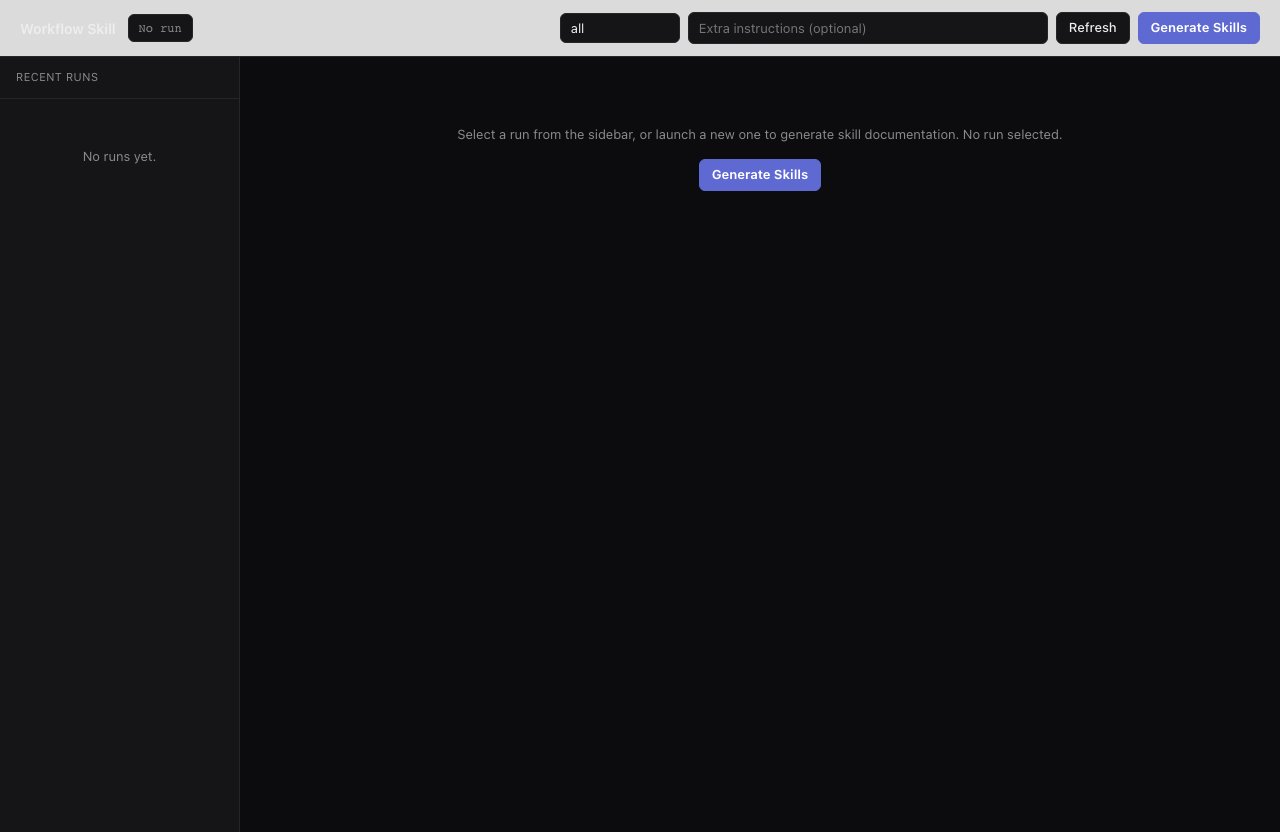
`workflow-skill` is an archived example, not installed by `init` (copy it from `examples/init-pack/` with its dependency closure, or ask `create-workflow` to build an equivalent). It reads local Smithers workflow metadata and writes reusable, agent-facing skill docs: for each selected workflow it passes the ID, display name, source type, entry file path, and full source to an agent, which infers descriptions, inputs, and other fields from that source.
For deterministic, no-agent generation, use the CLI command below; the generated skill includes the workflow's real input schema (field names, types, required/default status, enum values, and descriptions when the Zod schema provides them).
```bash theme={"theme":{"light":"github-light","dark":"github-dark"}}
bunx smthrs workflow skills
```
 Inspect the same machine-readable contract without writing files:
```bash theme={"theme":{"light":"github-light","dark":"github-dark"}}
bunx smthrs workflow inspect mission --format json
```
For agent-driven generation with prompt customization, use:
```bash theme={"theme":{"light":"github-light","dark":"github-dark"}}
bunx smthrs workflow run workflow-skill --input '{"workflow":"mission"}'
```
## Inputs
| Input | Type | Default |
| ---------- | -------------- | ------- |
| `workflow` | string | `"all"` |
| `output` | string or null | `null` |
| `prompt` | string | `""` |
## Output Rules
* `workflow: "all"` scans every local workflow except `workflow-skill`.
* If `output` is omitted, skills are written under `.smithers/skills/`: Smithers-owned generated output that Claude Code, Codex, and other coding harnesses won't auto-discover unless your project bridges it into the harness skill directory, typically `.agents/skills`.
* If `workflow` is one workflow ID and `output` is provided, the agent writes exactly that file path.
* If `workflow` is `"all"` and `output` is provided, the agent treats it as a directory and writes one skill per workflow.
## Examples
Generate one skill:
```bash theme={"theme":{"light":"github-light","dark":"github-dark"}}
bunx smthrs workflow run workflow-skill \
--input '{"workflow":"mission","output":".smithers/skills/mission.md"}'
```
Generate skills for every local workflow:
```bash theme={"theme":{"light":"github-light","dark":"github-dark"}}
bunx smthrs workflow run workflow-skill \
--input '{"workflow":"all","output":".smithers/skills"}'
```
Inspect the same machine-readable contract without writing files:
```bash theme={"theme":{"light":"github-light","dark":"github-dark"}}
bunx smthrs workflow inspect mission --format json
```
For agent-driven generation with prompt customization, use:
```bash theme={"theme":{"light":"github-light","dark":"github-dark"}}
bunx smthrs workflow run workflow-skill --input '{"workflow":"mission"}'
```
## Inputs
| Input | Type | Default |
| ---------- | -------------- | ------- |
| `workflow` | string | `"all"` |
| `output` | string or null | `null` |
| `prompt` | string | `""` |
## Output Rules
* `workflow: "all"` scans every local workflow except `workflow-skill`.
* If `output` is omitted, skills are written under `.smithers/skills/`: Smithers-owned generated output that Claude Code, Codex, and other coding harnesses won't auto-discover unless your project bridges it into the harness skill directory, typically `.agents/skills`.
* If `workflow` is one workflow ID and `output` is provided, the agent writes exactly that file path.
* If `workflow` is `"all"` and `output` is provided, the agent treats it as a directory and writes one skill per workflow.
## Examples
Generate one skill:
```bash theme={"theme":{"light":"github-light","dark":"github-dark"}}
bunx smthrs workflow run workflow-skill \
--input '{"workflow":"mission","output":".smithers/skills/mission.md"}'
```
Generate skills for every local workflow:
```bash theme={"theme":{"light":"github-light","dark":"github-dark"}}
bunx smthrs workflow run workflow-skill \
--input '{"workflow":"all","output":".smithers/skills"}'
```