> ## Documentation Index
> Fetch the complete documentation index at: https://smithers.sh/llms.txt
> Use this file to discover all available pages before exploring further.
# mission
> Long-horizon workflow with planning, approval, milestone validation, and focused workers.
`mission` is an archived example, not installed by `init`. Copy it from `examples/init-pack/` with its dependency closure, or ask `create-workflow` for one, then run it:
`mission` handles work too long or broad for one agent loop, running milestones one at a time with parallel feature workers, integration, and validation (see How It Runs).
```bash theme={"theme":{"light":"github-light","dark":"github-dark"}}
bunx smthrs workflow run mission --prompt "Migrate the dashboard to the new gateway APIs"
```
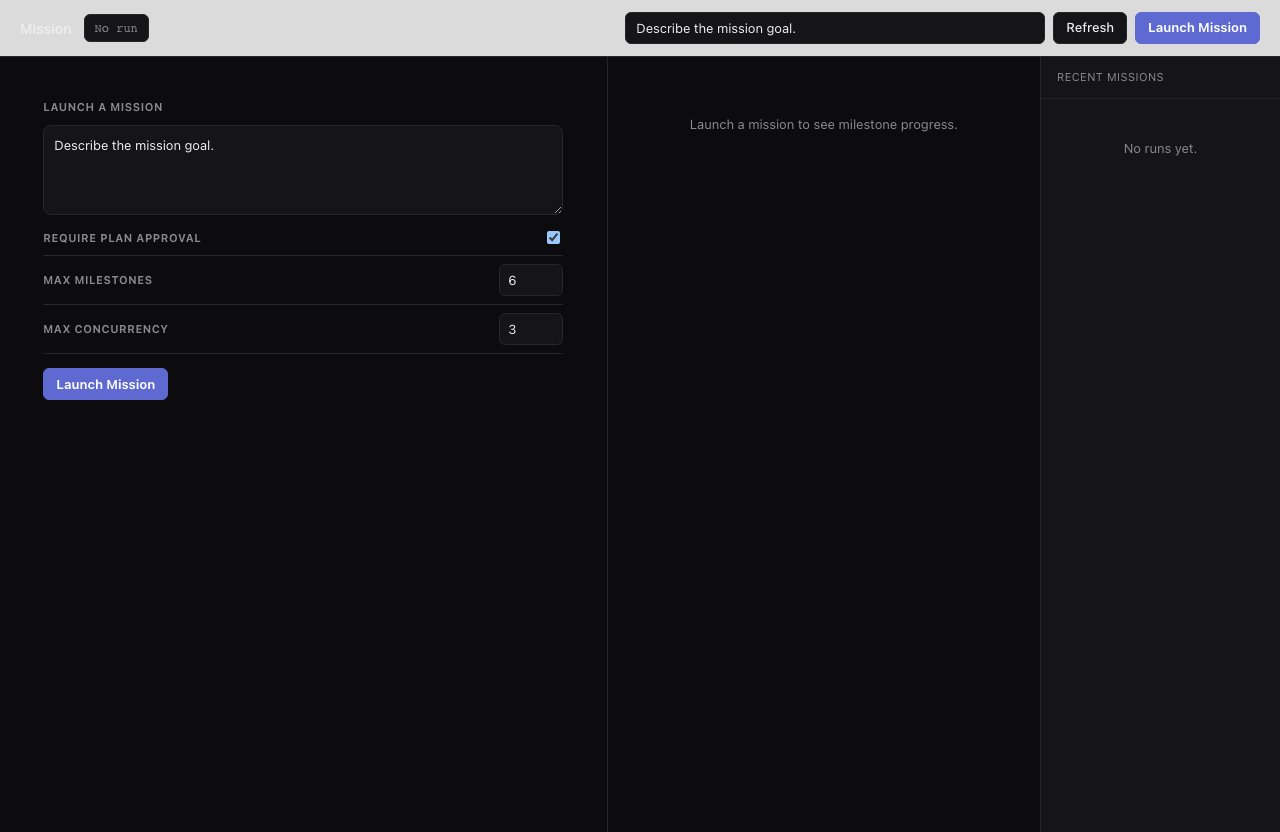 ## Inputs
| Input | Type | Default |
| ------------------------- | ------- | ------------------------------ |
| `prompt` | string | `"Describe the mission goal."` |
| `requirePlanApproval` | boolean | `true` |
| `maxMilestones` | number | `6` |
| `maxFeaturesPerMilestone` | number | `6` |
| `maxConcurrency` | number | `3` |
| `useWorktrees` | boolean | `false` |
| `baseBranch` | string | `"main"` |
Example with worktree isolation:
```bash theme={"theme":{"light":"github-light","dark":"github-dark"}}
bunx smthrs workflow run mission \
--input '{"prompt":"Build import/export support","useWorktrees":true,"maxConcurrency":4}'
```
## How It Runs
1. The orchestrator scopes the request and creates serial milestones.
2. If approval is enabled, the run pauses (see Approval below).
3. The active milestone dispatches feature workers with fresh focused prompts.
4. The integration task merges or reconciles the feature outputs.
5. Validation runs tests, builds, and smoke checks, plus UI walkthroughs if the repo has a configured browser test command.
6. Failed validation triggers one targeted repair task and a revalidation.
7. After all milestones complete, the final task writes a mission report.
## Approval
When `requirePlanApproval` is `true`, the run pauses after planning and emits `mission:approve-plan`. Review the proposed milestones, then resume:
```bash theme={"theme":{"light":"github-light","dark":"github-dark"}}
bunx smthrs approve RUN_ID --node mission:approve-plan
```
Canceling the run at the approval gate aborts the mission.
## Output Shape
`mission` commits changes incrementally as each milestone completes; the final report to the run log summarizes milestones, validation outcomes, and any unresolved failures.
## Use it when
* Work is too long or broad for one agent loop and you want milestone-by-milestone progress with an approval gate and validation.
## Use something else when
* The change is a single focused unit: use [`implement`](/workflows/implement).
* You want independent tickets in isolated worktrees: use [`tickets-create`](/workflows/tickets-create), then [`kanban`](/workflows/kanban).
## Resume & retry
Runs are durable: resuming with `up --resume` continues from the last finished milestone.
## Inputs
| Input | Type | Default |
| ------------------------- | ------- | ------------------------------ |
| `prompt` | string | `"Describe the mission goal."` |
| `requirePlanApproval` | boolean | `true` |
| `maxMilestones` | number | `6` |
| `maxFeaturesPerMilestone` | number | `6` |
| `maxConcurrency` | number | `3` |
| `useWorktrees` | boolean | `false` |
| `baseBranch` | string | `"main"` |
Example with worktree isolation:
```bash theme={"theme":{"light":"github-light","dark":"github-dark"}}
bunx smthrs workflow run mission \
--input '{"prompt":"Build import/export support","useWorktrees":true,"maxConcurrency":4}'
```
## How It Runs
1. The orchestrator scopes the request and creates serial milestones.
2. If approval is enabled, the run pauses (see Approval below).
3. The active milestone dispatches feature workers with fresh focused prompts.
4. The integration task merges or reconciles the feature outputs.
5. Validation runs tests, builds, and smoke checks, plus UI walkthroughs if the repo has a configured browser test command.
6. Failed validation triggers one targeted repair task and a revalidation.
7. After all milestones complete, the final task writes a mission report.
## Approval
When `requirePlanApproval` is `true`, the run pauses after planning and emits `mission:approve-plan`. Review the proposed milestones, then resume:
```bash theme={"theme":{"light":"github-light","dark":"github-dark"}}
bunx smthrs approve RUN_ID --node mission:approve-plan
```
Canceling the run at the approval gate aborts the mission.
## Output Shape
`mission` commits changes incrementally as each milestone completes; the final report to the run log summarizes milestones, validation outcomes, and any unresolved failures.
## Use it when
* Work is too long or broad for one agent loop and you want milestone-by-milestone progress with an approval gate and validation.
## Use something else when
* The change is a single focused unit: use [`implement`](/workflows/implement).
* You want independent tickets in isolated worktrees: use [`tickets-create`](/workflows/tickets-create), then [`kanban`](/workflows/kanban).
## Resume & retry
Runs are durable: resuming with `up --resume` continues from the last finished milestone.