> ## Documentation Index
> Fetch the complete documentation index at: https://smithers.sh/llms.txt
> Use this file to discover all available pages before exploring further.
# Watch and Steer Your Runs
> See what your agent set running, follow it live, inspect what each step produced, and steer it, all by talking to your agent.
You can watch everything your agent set running. Nothing is a black box.
You started the run by asking, and you watch it by asking: "What's running?" "Show me what step 3 produced." Your agent runs the read commands under the hood and reports back. Every run is durable, so its state is on disk to inspect, even after a crash, even hours later.
## The observe loop
Three moves: list what's active, follow one live, inspect what a step produced.
| You ask your agent | Smithers runs under the hood | You get back |
| ------------------------------------ | -------------------------------------------------------------------------------------------------------------- | ------------------------------------------------------------ |
| "What's running, and which need me?" | `bunx smithers-orchestrator ps` | Every active, paused, and recently finished run, with status |
| "Follow the implement run." | `bunx smithers-orchestrator chat --follow` / `bunx smithers-orchestrator inspect --watch` | Live agent output and step-by-step progress, streaming |
| "Show me what step 3 produced." | `bunx smithers-orchestrator inspect` / `bunx smithers-orchestrator output` / `bunx smithers-orchestrator diff` | The structured output, the diff, the exact tool calls |
You never memorize the commands; you drive it through your agent. Anything `waiting-approval` is flagged as a run paused at a gate.
 ## Visual workflow views
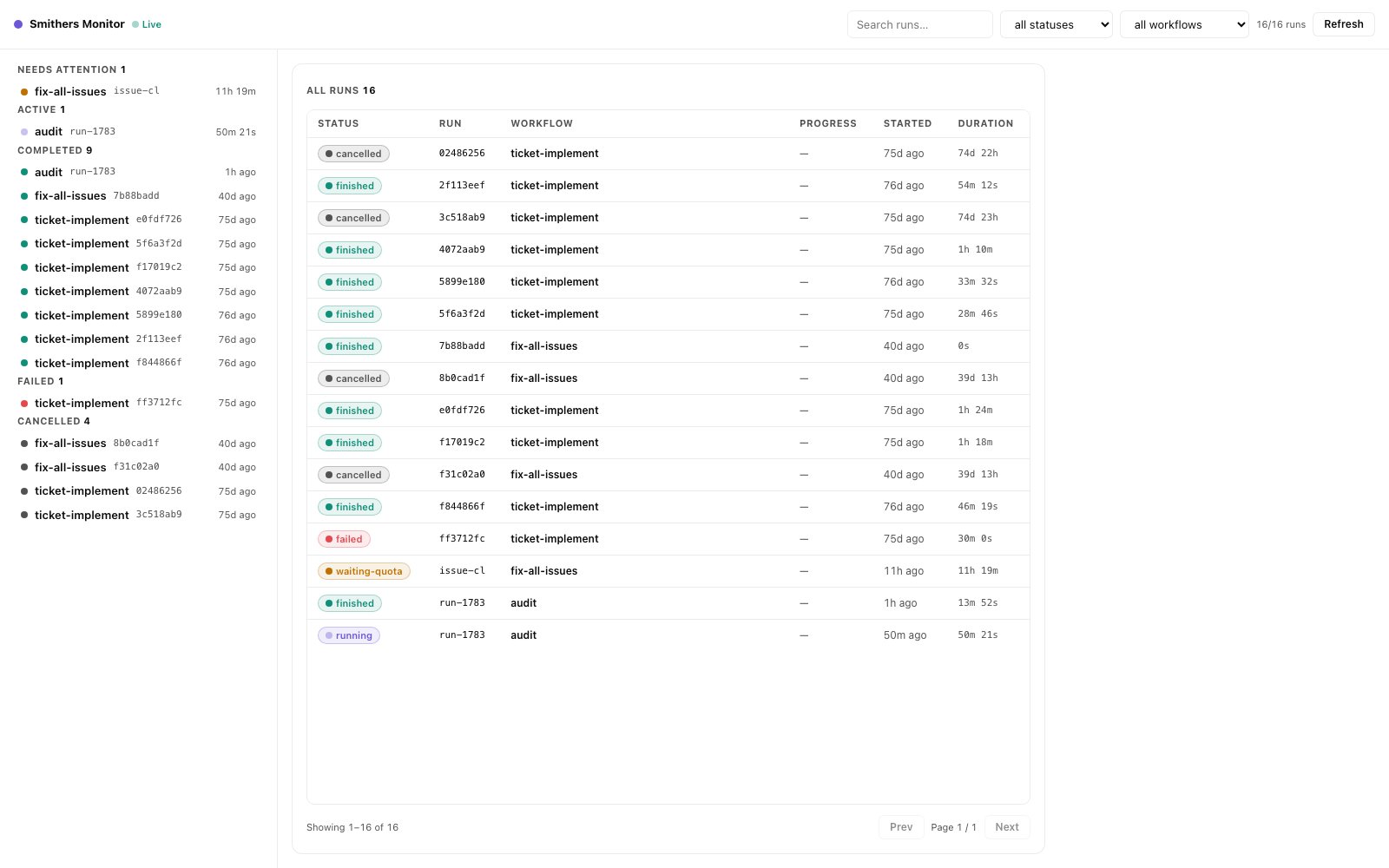
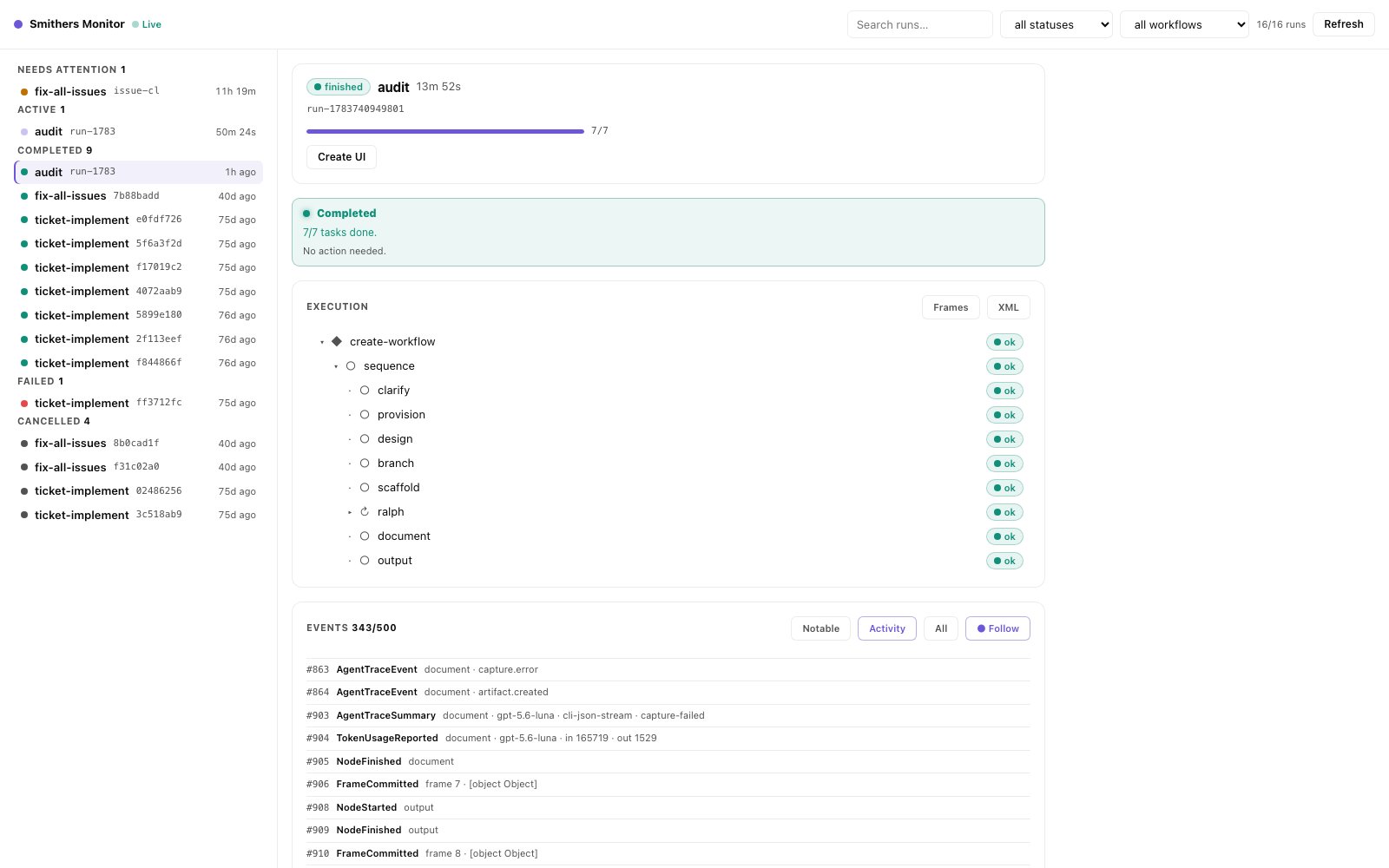
The default watch path is still the agent-driven CLI loop above, not a GUI you click through. When you want one live page over *every* run (grouped run list, execution tree, event stream, and an approvals inbox), ask your agent to open the Smithers Monitor with `bunx smithers-orchestrator monitor`. It needs zero setup and only observes: opening it launches nothing. When a workflow ships a purpose-built browser view, ask your agent to open it with `bunx smithers-orchestrator ui`.
## Visual workflow views
The default watch path is still the agent-driven CLI loop above, not a GUI you click through. When you want one live page over *every* run (grouped run list, execution tree, event stream, and an approvals inbox), ask your agent to open the Smithers Monitor with `bunx smithers-orchestrator monitor`. It needs zero setup and only observes: opening it launches nothing. When a workflow ships a purpose-built browser view, ask your agent to open it with `bunx smithers-orchestrator ui`.
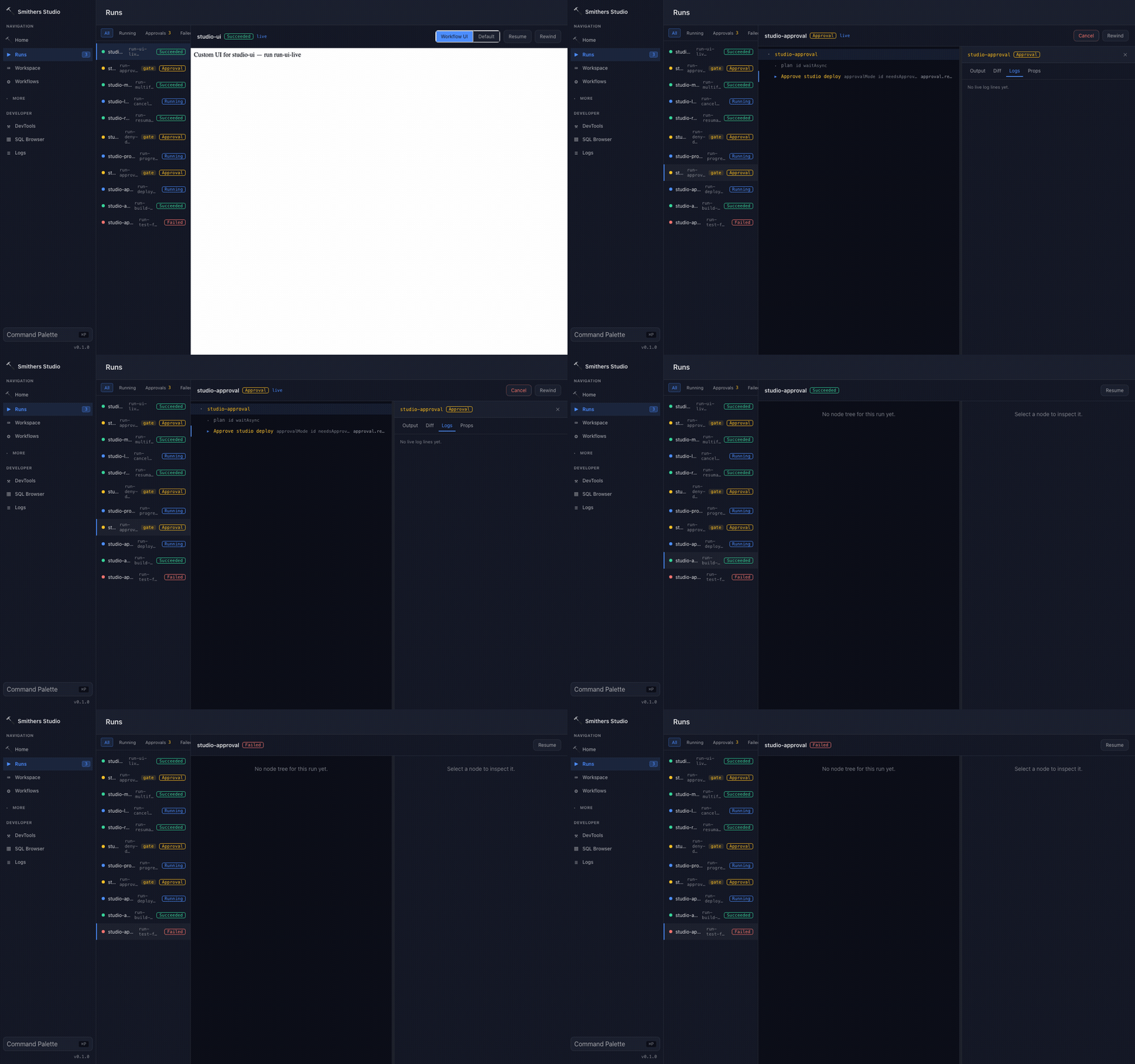
 The Smithers workflow UI surface renders the browser UI that lives with that workflow, such as a kanban board, approval dashboard, or review surface. It is for the run you are steering, not a separate product console you must learn before Smithers is useful.
Your agent builds these views for you, and it does not hand-roll them: every workflow UI is composed from the Smithers component library, which ports [shadcn/ui](https://ui.shadcn.com) anatomy and adds agent-native components built specifically for Smithers (reasoning traces, tool calls, plans, approvals, live run trees). That is why every view your agent ships looks consistent, works in light and dark, and stays accessible. The [UI Docs by Type](/reference/ui/overview) page maps the whole surface if you want to see what your agent is working with.
The CLI watch loop (`ps`, `chat --follow`, `inspect --watch`) remains the always-available path, and works on any machine, with any agent, no GUI required.
## Browser and remote access
You do not have to be at the machine that started the run. Ask your agent to serve the run or open its workflow UI, and you get an HTTP control plane you can reach from a browser: your laptop watching a run on a remote box, or a teammate following along.
For programmatic and multi-user access (bots, dashboards, schedulers authenticating once and streaming events), the [Gateway](/integrations/gateway) is the headless control plane behind the same run data.
## Steering from here
Watching is half of it; steering is the other half, and it's the same loop. You see something, you tell your agent what to do about it.
| You see | You ask your agent | Smithers does |
| -------------------------------- | ------------------------------------------------------------ | ------------------------------------------------------- |
| A run paused at an approval gate | "Approve the deploy step." / "Deny it, the tests are stale." | Resolves the gate and the run continues or stops |
| A run heading the wrong way | "Cancel the implement run." | Safely halts the agents and terminates that run |
| Everything needs to stop | "Cancel everything that's running." | Tears down every active run, like `docker compose down` |
| A step that went wrong | "Redo the reviewer step on the last run." | Retries that task and resumes the workflow from there |
Because every run is durable (render → execute → persist), steering is never lossy: approve a gate, cancel a run, or redirect a step without losing the work already on disk.
## Read next
**How-to:** the phrasing that starts every run, and how asking your agent kicks off durable work.
**Reference:** the full catalog of outcomes, including the runs you start and walk away from.
**Explanation:** why a paused run costs nothing and a crashed run resumes without losing work.
**Under the hood:** every read and steer command, plus the headless control plane for remote and multi-user access.
The Smithers workflow UI surface renders the browser UI that lives with that workflow, such as a kanban board, approval dashboard, or review surface. It is for the run you are steering, not a separate product console you must learn before Smithers is useful.
Your agent builds these views for you, and it does not hand-roll them: every workflow UI is composed from the Smithers component library, which ports [shadcn/ui](https://ui.shadcn.com) anatomy and adds agent-native components built specifically for Smithers (reasoning traces, tool calls, plans, approvals, live run trees). That is why every view your agent ships looks consistent, works in light and dark, and stays accessible. The [UI Docs by Type](/reference/ui/overview) page maps the whole surface if you want to see what your agent is working with.
The CLI watch loop (`ps`, `chat --follow`, `inspect --watch`) remains the always-available path, and works on any machine, with any agent, no GUI required.
## Browser and remote access
You do not have to be at the machine that started the run. Ask your agent to serve the run or open its workflow UI, and you get an HTTP control plane you can reach from a browser: your laptop watching a run on a remote box, or a teammate following along.
For programmatic and multi-user access (bots, dashboards, schedulers authenticating once and streaming events), the [Gateway](/integrations/gateway) is the headless control plane behind the same run data.
## Steering from here
Watching is half of it; steering is the other half, and it's the same loop. You see something, you tell your agent what to do about it.
| You see | You ask your agent | Smithers does |
| -------------------------------- | ------------------------------------------------------------ | ------------------------------------------------------- |
| A run paused at an approval gate | "Approve the deploy step." / "Deny it, the tests are stale." | Resolves the gate and the run continues or stops |
| A run heading the wrong way | "Cancel the implement run." | Safely halts the agents and terminates that run |
| Everything needs to stop | "Cancel everything that's running." | Tears down every active run, like `docker compose down` |
| A step that went wrong | "Redo the reviewer step on the last run." | Retries that task and resumes the workflow from there |
Because every run is durable (render → execute → persist), steering is never lossy: approve a gate, cancel a run, or redirect a step without losing the work already on disk.
## Read next
**How-to:** the phrasing that starts every run, and how asking your agent kicks off durable work.
**Reference:** the full catalog of outcomes, including the runs you start and walk away from.
**Explanation:** why a paused run costs nothing and a crashed run resumes without losing work.
**Under the hood:** every read and steer command, plus the headless control plane for remote and multi-user access.